Extending Acumatica Inventory Management with ConverSight Supply Chain Visibility
Introduction
In today’s fast-paced manufacturing and supply chain environment, Acumatica Cloud ERP plays a central role in driving operational efficiency. Acumatica provides a strong, trusted foundation for inventory and process management — giving organizations the structured data and workflows they need to run their business with confidence.
ConverSight is a proud Acumatica Technology Partner Working closely with Acumatica and its VAR community — including Net at Work, DSD, and Practical Software — to extend Acumatica with AI Supply Chain Visibility.
ConverSight, as a proud Acumatica Technology Partner, extends that foundation with a Supply Chain Visibility solution that brings Acumatica data into a unified, daily-refreshed analytics layer. ConverSight integrates directly with Acumatica to simplify access, reduce manual effort, and put self-service reporting and natural-language analytics into the hands of every Acumatica user.
Together, Acumatica and ConverSight help manufacturers and distributors move from static reports to a clearer, organization-wide view of inventory and supply chain performance — where business users can build their own reports on Acumatica data through drag-and-drop, ask questions in plain language, and act on threshold-based alerts.
In this article, we’ll explore Acumatica’s inventory management capabilities and how ConverSight, working closely with Acumatica and its VAR community, builds on that foundation to make inventory reporting and supply chain visibility more accessible and effective.
In this article:
What is Acumatica Cloud ERP?
Does Acumatica Offer Inventory Management?
How do I report on Inventory in Acumatica?
Key Inventory Reports in Acumatica
How to Improve Inventory Reporting in Acumatica
Using AI for Inventory Visibility in Acumatica
Is there an Acumatica Report that Shows All Inventory?
Automated Reporting with ConverSight for Acumatica
How to Add Custom Fields to Inventory Lookup in Acumatica
Adding Supply Chain Visibility to Acumatica
What is Acumatica Cloud ERP?
Acumatica Cloud ERP is an integrated business management platform designed to help organizations manage operations with greater efficiency. Built on a cloud-first architecture, Acumatica offers a range of modules spanning financial management, manufacturing, distribution, and customer relationship management (CRM).
One of Acumatica’s core modules is Inventory Management — a comprehensive toolkit for tracking stock, managing warehouses, handling order flows, and aligning inventory with financial processes. When ConverSight is introduced into the Acumatica environment, that inventory data becomes accessible through a unified analytics platform, where teams can build self-service reports, ask natural-language questions, and receive alerts on key metrics.
Acumatica’s cloud-based infrastructure allows businesses to access the platform from anywhere, at any time, using any device. This flexibility, combined with Acumatica’s robust features, makes it an attractive option for companies of all sizes, especially those looking to modernize their operations.
Acumatica is modular, meaning businesses can choose the features they need and scale up as their requirements grow. Inventory management is one of Acumatica’s core modules, providing companies with a comprehensive suite of tools to track and manage their stock efficiently.
Yes, Acumatica offers a powerful inventory management module that enables businesses to streamline their supply chain processes, manage stock levels, and improve the overall efficiency of their operations. Acumatica’s inventory management features are designed to cater to a wide range of industries, from retail and wholesale distribution to manufacturing and e-commerce.
Key features of Acumatica Inventory Management:
Inventory Tracking: Acumatica allows users to track current inventory levels, ensuring that the business always knows exactly how much stock is available.
Location Management: Acumatica users can manage multiple warehouses, as well as define location defaults for receiving, returns, and shipping.
Inventory Valuation: Acumatica supports various inventory valuation methods, including FIFO, LIFO, and Average Cost.
Replenishment Methods: Acumatica users can define min/max quantities, reorder points, seasonality, trends, and more to accurately stock items.
Traceability: Acumatica supports tracking inventory by lot or serial number, as well as defining shelf life for perishable inventory.
Integrated Processes: Acumatica ties financial reporting directly to purchasing, sales, projects, field service, and manufacturing, with automation, scheduled tasks, and custom workflows.
Two-Step Receipt Verification: Acumatica lets users implement a two-step verification process for inventory receipts, allowing for greater control over item quantities and product quality.
Integration Across Acumatica Modules: Acumatica’s inventory management is fully integrated with sales, purchasing, accounting, and manufacturing — ensuring that inventory transactions are automatically reflected across the entire Acumatica platform.
Where ConverSight Extends Acumatica Inventory Capabilities
Acumatica provides a strong inventory data foundation. ConverSight, as an Acumatica Technology Partner, extends that foundation with a Supply Chain Visibility that complements Acumatica in several practical ways:
Self-Service Drill-Down on Acumatica Data: ConverSight’s Explorer lets business users drill into Acumatica inventory data through a drag-and-drop interface — no custom Acumatica development required.
Custom Field Access: Custom fields configured in Acumatica can be surfaced in ConverSight reports, so warehouse-specific data points are easy to analyze alongside standard Acumatica inventory metrics.
Self-Service on Top of Acumatica GIs: Acumatica Generic Inquiries continue to serve as a trusted reporting framework; ConverSight adds a unified, daily-refreshed analytics layer for cross-functional inventory analysis.
Role-Based Dashboards: Customizable dashboards let Acumatica warehouse managers, procurement leads, and operations teams focus on the inventory metrics most relevant to their roles.
Daily-Refreshed Inventory View: ConverSight provides a consistent daily snapshot of Acumatica inventory across the organization, ideal for warehouse teams and sales fulfillment workflows.
Reporting is one of the most critical aspects of effective inventory management, and Acumatica provides a wide range of reporting tools that allow you to gain insights into your inventory data.
Acumatica generates reports based on user roles and permissions, making it easy for users to digest reports and share them with third-party stakeholders. Acumatica’s dashboards make it easy for users to access inventory insights for everyday decision-making.
Let’s explore the different types of Inventory Reports in Acumatica:
1. Inventory Status Report
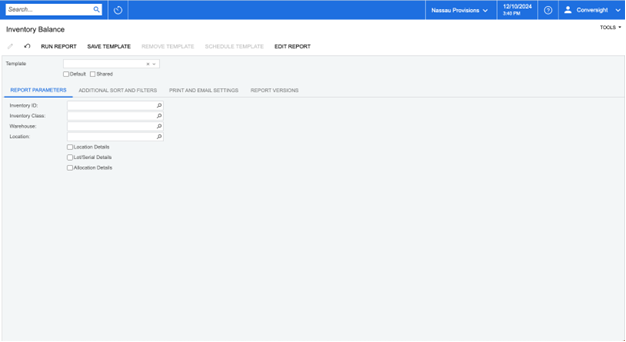
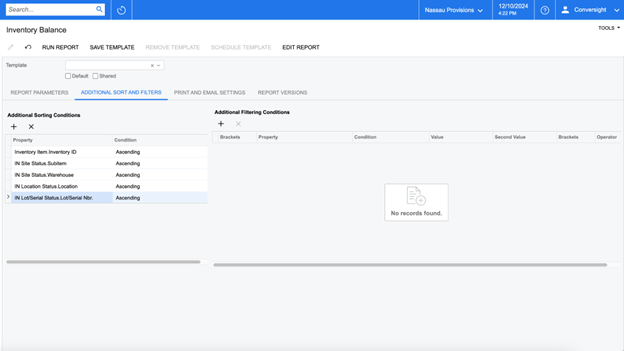
The Acumatica Inventory Status Report provides a snapshot of current inventory levels, showing how much stock is available by item, warehouse, and location. This report helps managers monitor stock levels, track backordered items, and identify products that may be understocked or overstocked.
2. Inventory Valuation Reports
Acumatica supports several inventory valuation reports that allow you to assess the total value of your stock based on the valuation method chosen (FIFO, LIFO, or Average Cost). These reports are essential for financial accounting, as they help ensure your balance sheet accurately reflects the value of your inventory.
3. Stock Transaction History Report
The Acumatica Stock Transaction History Report tracks all movements of inventory, including purchases, sales, returns, adjustments, and transfers. This detailed report helps businesses maintain accurate records for audit purposes and provides visibility into how inventory levels have changed over time.
4. Inventory Turnover Report
This Acumatica report calculates how often your inventory is sold and replaced during a given period. It provides a critical measure of inventory efficiency and can help businesses identify slow-moving items, which can be discounted or removed from inventory to free up working capital.
5. Sales Demand Reports
Acumatica’s sales demand reports surface historical sales patterns and trends, giving teams a clear view of how products have moved over time. These reports are valuable for understanding stock performance and informing planning conversations.
6. Custom Reports and Storyboards
One of the key benefits of Acumatica is its flexibility in creating custom reports. Using Acumatica’s built-in report designer, you can create custom inventory reports tailored to your specific business needs. These reports can be saved, scheduled, and shared with other team members to provide insights on inventory performance. Acumatica’s storyboard capabilities also enable users to create visual reports and KPIs that provide an organization-wide view of inventory levels, order statuses, and trends — helping teams stay on top of inventory dynamics within Acumatica
How to Improve Inventory Reporting in Acumatica
Acumatica gives organizations a solid reporting foundation. ConverSight, as an Acumatica Technology Partner, builds on that with a Supply Chain Visibility that extends Acumatica reporting through self-service Explorer, natural-language analytics with Athena Explorer, and daily-refreshed dashboards — making Acumatica inventory insights accessible to every user, not just technical ones.
By integrating ConverSight with Acumatica, teams move from manual report-building to a self-service experience. Reports can be built through drag-and-drop on Acumatica data, questions can be asked in plain language, and threshold-based alerts surface issues as the daily refresh brings new data in.
1. Build on a Consistent Daily-Refreshed Acumatica View
ConverSight integrates with Acumatica and brings inventory data into a unified analytics platform that refreshes daily. This gives teams a single, dependable view of Acumatica inventory across the organization to start each day.
Action: Set up ConverSight to display Acumatica inventory data in a daily-refreshed dashboard, so cross-functional teams work from the same numbers.
2. Create Custom Dashboards for Acumatica Inventory Insights
ConverSight allows you to create custom dashboards tailored to your specific Acumatica inventory needs. These dashboards can display key performance indicators such as stock levels, order quantities, aging inventory, and more — all drawn from Acumatica.
Action: Design inventory-specific dashboards in ConverSight that reflect the Acumatica metrics that matter most:
Current Stock Levels: Visual charts or graphs showing Acumatica quantities by item or location.
Inventory Turnover: Track how quickly Acumatica items are sold and replaced.
Stock Valuation: Visualize the total value of Acumatica inventory based on the latest refresh.
Order Trends: Monitor incoming Acumatica orders and stock-outs to understand inventory dynamics.
3. Set Threshold-Based Alerts and Notifications on Acumatica Data
Setting up alerts in ConverSight helps you stay on top of Acumatica inventory by notifying you when stock levels fall below a defined threshold, when inventory is aging, or when there are notable discrepancies in the daily refresh.
Action: Configure alerts for:
Low Stock: Alerts for Acumatica items that are running low and may need reordering attention from your procurement team.
Slow-Moving Inventory: Alerts for Acumatica products that have been sitting in stock for an extended period.
Backordered Items: Notifications when a backorder in Acumatica is due for fulfillment.
4. Analyze Inventory Trends with Interactive Reporting
Use ConverSight’s interactive reporting capabilities to drill into Acumatica inventory trends over time, understand historical seasonal patterns, and identify supply chain inefficiencies worth addressing with your team.
Action: Create visual reports showing historical Acumatica inventory data, order fulfillment rates, and vendor performance — surfacing opportunities to optimize purchasing or streamline warehousing.
5. Drill Down into Acumatica Inventory Details
ConverSight’s Explorer makes it easy to drill into specific Acumatica items or categories to analyze their performance in detail. This helps you understand which products are driving inventory costs and which are underperforming.
Action: Use Explorer’s drag-and-drop drill-down to analyze:
Individual Acumatica item sales performance
Historical Acumatica inventory fluctuations for each SKU
Product lifecycle data to inform decisions about discontinuing or reordering products in Acumatica
6. Track Multiple Locations and Warehouses
If your business has Acumatica inventory spread across different warehouses or locations, ConverSight provides a consolidated view of stock across all sites, supporting better cross-location management conversations.
Action: Set up reports that show Acumatica inventory across different locations and warehouses, helping you quickly identify where a product is overstocked or understocked.
7. Bring in Supplier and Vendor Visibility
Inventory management is not just about what you have in stock but also about understanding your supplier landscape. ConverSight can incorporate vendor and supplier data alongside Acumatica inventory data for a more complete picture.
Action: Create a ConverSight report showing supplier lead times, reorder points, and historical supplier performance from Acumatica, so teams have the context they need when planning replenishment.
8. Simplify Decision-Making with Natural-Language Questions
ConverSight offers natural-language query capabilities through Athena Explorer, so users can simply ask questions about Acumatica inventory in plain language (e.g., “What is the current stock level of product X?” or “Which items have been in stock for over 90 days?”).
Action: Encourage your team to use Athena Explorer for natural-language questions on Acumatica data, retrieving inventory insights quickly without navigating multiple screens or filters.
9. Leverage Mobile Access for On-the-Go Acumatica Visibility
If your team needs access to Acumatica inventory reports on the go, ConverSight offers mobile-friendly dashboards and reports — ideal for warehouse managers or field teams who need quick access to inventory insights.
Action: Set up mobile access to Acumatica inventory dashboards and alerts for warehouse managers to check stock levels or track order status while in the field.
Using AI For Inventory Management in Acumatica
Here is how AI extends inventory visibility in Acumatica Cloud ERP — making it easier for every Acumatica user to find, understand, and share inventory insights drawn from the data Acumatica already collects.
1. Self-Service Reporting with Explorer on Acumatica Data
Acumatica’s reporting framework is powerful for technical users. ConverSight’s Explorer extends that power to business users with a drag-and-drop interface for building reports on Acumatica inventory data.
How it works with Acumatica:
Users select the columns and fields they need from Acumatica inventory data, group and filter on the fly, and save reports for future use — all without writing Acumatica queries.
Reports are built on top of the daily-refreshed analytics layer drawn from Acumatica, ensuring a consistent organization-wide view.
Action: Roll out Explorer to Acumatica inventory and operations teams so they can build their own reports, freeing IT and Acumatica VARs from custom report requests.
2. Natural-Language Insights with Athena Explorer
Athena Explorer, ConverSight’s conversational AI assistant, lets users interact with Acumatica inventory data in plain language. This extends Acumatica’s reach to every user, regardless of technical background.
How it works with Acumatica:
Users ask questions like “What is the current stock for SKU 1234?” or “Which products have the lowest turnover?” and Athena Explorer returns the answer drawn from Acumatica.
Athena Explorer draws on the structured data Acumatica already provides, so answers stay grounded in Acumatica as the source of truth.
Action: Enable Athena Explorer for Acumatica inventory teams so they can get answers without navigating complex Acumatica queries or screens.
3. Inventory Visibility Across Acumatica Locations
ConverSight extends Acumatica’s multi-warehouse capabilities with a unified view of inventory across all locations, brought together in a single daily-refreshed dashboard.
How it works with Acumatica:
Inventory data from Acumatica is consolidated into role-based dashboards that show stock levels, movements, and trends across all warehouses at a glance.
Teams can drill from the cross-location view down to individual Acumatica SKUs through Explorer.
Action: Build a cross-location dashboard in ConverSight to give operations leaders an organization-wide view of Acumatica inventory.
4. Supplier Performance Visibility from Acumatica
ConverSight surfaces supplier performance metrics drawn from Acumatica — helping you understand which suppliers consistently meet delivery times and quality standards.
How it works with Acumatica:
Past Acumatica purchase orders, deliveries, and performance data are aggregated into clear views, so you can compare suppliers side by side.
These insights inform conversations with your procurement team about supplier selection and contract negotiation.
Action: Use ConverSight to build supplier performance dashboards on top of Acumatica vendor data, supporting data-backed procurement conversations.
5. Visibility into Slow-Moving and Aging Acumatica Inventory
Excess and slow-moving inventory tie up working capital and increase storage costs. ConverSight helps surface these items early through alerts and dashboards built on Acumatica data.
How it works with Acumatica:
Sales velocity, inventory levels, and aging patterns from Acumatica are continuously surfaced in ConverSight.
Threshold-based alerts notify teams when Acumatica items have been in stock for extended periods, so they can take timely action through their normal Acumatica procurement and pricing workflows.
Action: Configure alerts for slow-moving and excess Acumatica inventory, giving teams the visibility they need to act on aging stock.
6. Visibility into Stockout and Overstock Risk in Acumatica
Inventory imbalance — whether stockouts or excess — is typically identified too late, after it has already impacted operations. ConverSight surfaces these risks early through threshold-based alerts on Acumatica data.
How it works with Acumatica:
ConverSight monitors stock levels from Acumatica against user-defined thresholds in the daily refresh.
Alerts notify the right people when stock levels approach critical thresholds, so they can act through their existing Acumatica procurement workflows.
Action: Set up alerts in ConverSight for Acumatica items at risk of stockouts or overstocking, surfacing risks early so teams can
Is there an Acumatica Report that shows all Inventory?
Yes, Acumatica offers several reports that give a comprehensive overview of all inventory items across your entire Acumatica system. Some of the most useful Acumatica reports for showing all inventory include:
1. Inventory Item List
The Acumatica Inventory Item List report is a basic yet effective report that shows all inventory items in your system, along with key details such as item codes, descriptions, quantities on hand, and stock values. This report is helpful for a quick overview of your entire Acumatica inventory.
2. Inventory Transactions Report
The Acumatica Inventory Transactions Report shows all transactions that have affected inventory levels, including purchases, sales, transfers, and adjustments. This report provides a detailed view of inventory movement, essential for understanding Acumatica inventory activity over a specific period.
3. Inventory Valuation Report
This Acumatica report displays all inventory items and their corresponding values, based on your selected inventory valuation method. The report shows the total value of your stock, as well as how that value has changed over time, which is particularly useful for financial analysis.
4. Inventory Aging Report
The Acumatica Inventory Aging Report categorizes inventory by the length of time it has been in stock. This report can help you identify slow-moving items that may need to be discounted, promoted, or removed from your Acumatica inventory.
Automated Reporting with ConverSight for Acumatica
ConverSight makes inventory reporting in Acumatica easier and more accessible by extending Acumatica’s data with Supply Chain Visibility capabilities. Through self-service Explorer, natural-language Athena Explorer, and customizable dashboards and alerts, ConverSight helps Acumatica teams move from manually building reports to interacting with inventory data directly.
By integrating with Acumatica Cloud ERP, ConverSight ensures that Acumatica inventory data flows into a unified analytics environment that refreshes daily, supporting consistent reporting and threshold-based alerts that surface issues as they emerge in the data.
1. Integrate ConverSight with Acumatica
Before extending Acumatica inventory reporting, ensure that ConverSight is properly integrated with Acumatica. This enables daily data exchange between the two systems, ensuring that inventory data, orders, sales, and other metrics flow from Acumatica into ConverSight reliably.
Action: Work with your Acumatica VAR partner — such as Net at Work, DSD, or Practical Software — to establish the integration between Acumatica and ConverSight, ensuring relevant data fields such as inventory levels, sales orders, purchase orders, and supplier data are included.
2. Build Self-Service Inventory Reports with Explorer
ConverSight’s Explorer lets business users build their own inventory reports on Acumatica data through a drag-and-drop interface, reducing the dependency on IT or your Acumatica VAR for custom reports.
Action: Identify the Acumatica inventory views that teams need most often and have business users build them in Explorer, saving them as shared reports for the broader organization.
Benefits:
Business users get the Acumatica inventory views they need without IT involvement.
Reports are built on the trusted Acumatica data foundation.
3. Daily-Refreshed Dashboards for Acumatica Inventory Visibility
Inventory dashboards in ConverSight refresh daily from Acumatica, giving teams a consistent organization-wide view to start each day. This makes it easier to spot trends, monitor metrics, and have conversations grounded in the same numbers.
Action: Set up role-based dashboards in ConverSight for Acumatica warehouse managers, procurement teams, and operations leaders — each with the inventory metrics most relevant to their work.
Benefits:
A single, consistent view of Acumatica inventory shared across the organization.
Reduced time spent reconciling different views of the same Acumatica data.
4. Supplier Performance Visibility from Acumatica
ConverSight helps optimize supplier conversations by surfacing supplier performance, delivery times, and order accuracy from Acumatica data.
Action: Analyze supplier data from Acumatica in ConverSight to understand lead times, order fulfillment rates, and performance — informing supplier selection and renegotiation conversations.
Benefits:
Data-driven insights to inform supplier conversations using Acumatica data.
Clearer visibility into supplier performance trends over time.
5. Acumatica Inventory Movement Tracking
ConverSight surfaces inventory movements from Acumatica in clear, accessible views — making it easier to spot trends or discrepancies that warrant a closer look.
Action: Use ConverSight’s dashboards and Explorer reports to monitor Acumatica inventory movement, with threshold-based alerts surfacing items that need attention from your team.
Benefits:
Consistent visibility into Acumatica inventory changes.
Faster awareness of items that may need follow-up.
6. Cycle Counting Visibility
Cycle counting and inventory reconciliation in Acumatica can be supported with better data through ConverSight. By surfacing high-priority items and discrepancies, ConverSight helps teams focus their counting efforts where it matters most.
Action: Use ConverSight to identify high-value or high-turnover items in Acumatica that warrant more frequent cycle counts, and configure alerts for items that show repeated discrepancies.
Benefits:
Better-prioritized cycle counting efforts in Acumatica.
Faster identification of discrepancies worth investigating.
7. Multi-Location Warehouse Visibility
For organizations operating multiple locations or warehouses in Acumatica, ConverSight provides a unified view of inventory distribution that supports better cross-site planning conversations.
Action: Use ConverSight to monitor Acumatica inventory across multiple warehouses or locations in a single dashboard, supporting decisions about stock movement and allocation through your standard Acumatica workflows.
Better-informed conversations about stock balancing.
8. Scheduled Reporting and Storyboards
ConverSight makes reporting on Acumatica data easier by enabling scheduled report delivery and interactive storyboards. Teams stay informed without manually pulling Acumatica reports each day.
Action: Set up scheduled reports in ConverSight to track key Acumatica inventory metrics such as stock turnover, aging inventory, order trends, and stockout risks. Schedule these reports to be sent to managers, warehouse teams, and procurement teams at daily, weekly, or monthly intervals.
9. Natural-Language Acumatica Inventory Insights with Athena Explorer
Athena Explorer lets users interact with Acumatica inventory data through natural language — removing the need for technical expertise or manual report building.
Action: Enable teams to ask Athena Explorer questions to quickly retrieve Acumatica inventory insights (e.g., “What is the current stock level for item X?” or “Which items have been overstocked in the last 30 days?”).
Benefits:
Faster access to Acumatica inventory insights without complex data handling.
Reduced dependency on manual report creation.
10. Threshold-Based Alerts for Proactive Acumatica Inventory Visibility
ConverSight enables proactive inventory awareness by monitoring the daily Acumatica data refresh and surfacing threshold breaches as they appear.
Action: Configure alerts for low stock, excess inventory, aging stock, and unfulfilled orders based on Acumatica insights from ConverSight, so the right people are notified when something warrants attention.
Benefits:
Earlier awareness of Acumatica inventory issues.
Reduced risk of stockouts, overstocking, and waste through faster team response.
How to Add Custom Fields to Inventory Lookup in Acumatica
Acumatica allows users to customize their inventory setup to meet specific business requirements. Adding custom fields to the Acumatica Inventory Lookup screen is one such customization that can help businesses track additional information about their inventory items — and those custom fields can then be surfaced in ConverSight reports for deeper analysis.
1. Navigate to the Acumatica Customization Menu
To add custom fields, go to the “Customization” menu within Acumatica. From here, select “Customization Projects” to create or modify an existing project.
2. Create a New Customization Project
If you don’t already have a customization project in Acumatica, click “New Project.” Give it a name (e.g., “Inventory Custom Fields”) and select “Add” to start editing the inventory module.
3. Add a New Field to the Acumatica Inventory Table
In the Acumatica Customization Project editor, navigate to the Inventory table (usually named InventoryItem). From here, click “Add Field” to create a new custom field. You can choose from various data types (text, date, number, etc.) depending on the kind of information you wish to track.
4. Edit the Acumatica Inventory Lookup Screen
Next, navigate to the Acumatica Inventory Lookup screen, where you want the new custom field to appear. In the screen editor, select the area where you want to place the custom field, then drag and drop the newly created field into the desired location.
5. Publish the Customization
Once you’ve added the custom field to the Acumatica lookup screen, save your changes and publish the customization. The new field will now be visible on the Acumatica Inventory Lookup screen, allowing users to enter and view additional data for each inventory item.
6. Test the Custom Field
After publishing the customization, test the new Acumatica field by adding data to it in the Inventory Lookup screen. Make sure it functions as expected and integrates with other areas of Acumatica, such as reports or dashboards.
7. Surface Acumatica Custom Fields in ConverSight
Once custom fields are published in Acumatica, they can be brought into ConverSight Explorer for self-service analysis. This means business users can build reports and dashboards that include your warehouse-specific or industry-specific Acumatica data points alongside standard inventory metrics — getting more value out of your Acumatica customization investment.
Adding Supply Chain Visibility to Acumatica
As an Acumatica Technology Partner, ConverSight is built to complement and extend Acumatica. Some top use cases that customers leverage in ConverSight for Acumatica include:
Self-Service Inventory Reporting on Acumatica: ConverSight’s Explorer extends Acumatica reporting with a drag-and-drop interface where business users build their own inventory reports without IT or Acumatica VAR support — reducing time spent on custom report requests.
ROI: 55% reduction in decision cycle time, 75% reduction in time spent by analysts.
Acumatica Inventory Tracking & Insights: ConverSight provides daily-refreshed visibility into Acumatica inventory across multiple locations, warehouses, and sales channels. Athena Explorer surfaces the Acumatica insights that warrant attention.
ROI: 40% reduction in time spent creating reports, 18% increase in on-time delivery, 24% reduction in e-commerce order fulfillment costs.
Cross-Location Acumatica Inventory Visibility: ConverSight brings inventory data from Acumatica together across warehouses and sites in a single, daily-refreshed dashboard — making it easier for teams to spot imbalances and have informed conversations about stock allocation.
ROI: 12% reduction in PO fulfillment delay, 40% reduction in PO and MO cycle time, 10% decrease in month-to-month costs.
Conclusion
Acumatica Cloud ERP provides a strong, trusted foundation for inventory and supply chain management. By extending Acumatica with ConverSight’s Supply Chain Visibility solution, organizations can make that foundation more accessible to every user — turning the data Acumatica already collects into self-service reports, natural-language answers, and threshold-based alerts that keep teams informed.
ConverSight extends Acumatica through Explorer (self-service drag-and-drop reporting), Athena Explorer (conversational AI for natural-language inventory questions), customizable dashboards, and a unified daily-refreshed analytics layer. Together, Acumatica and ConverSight help businesses gain a clearer, organization-wide view of inventory and supply chain performance — and act on that view through their existing Acumatica workflows.
As a proud Acumatica Technology Partner, ConverSight works closely with Acumatica and its VAR community — including Net at Work, DSD, and Practical Software — to deliver this value to Acumatica customers and ensure smooth implementation and support. See firsthand how ConverSight can extend your Acumatica instance with Supply Chain Visibility.
We use cookies to ensure that we give you the best experience on our website. If you continue to use this site we will assume that you are happy with it.