Decisions, not dashboards
Connect onceEvery system feeds one current data model.
Ask anythingPlain-language answers, with the reasoning shown.
Act with confidenceApprove, and it writes back to your ERP.
See why ConverSight
Digital CubeAthena IQDecision HubLive
Which SKUs will run out before the next PO lands?23 SKUs are at risk. Two inbound POs are 9 days late and safety stock is low.
Agent recommendationReorder 23 SKUs from two suppliersDraft PO ready · $48,200ApproveReviewWrites back to your ERP
4–6 wksTo your first solution live9×Mentions in Gartner’s 2023 report110Hours saved per week at Daimler

AI inventory planning that protects service without padded buffers

ConverSight’s inventory planning software sets safety stock, reorder points, and stocking strategy for every SKU from its own demand, lead time, and service target, so every buffer has a number Finance can check.

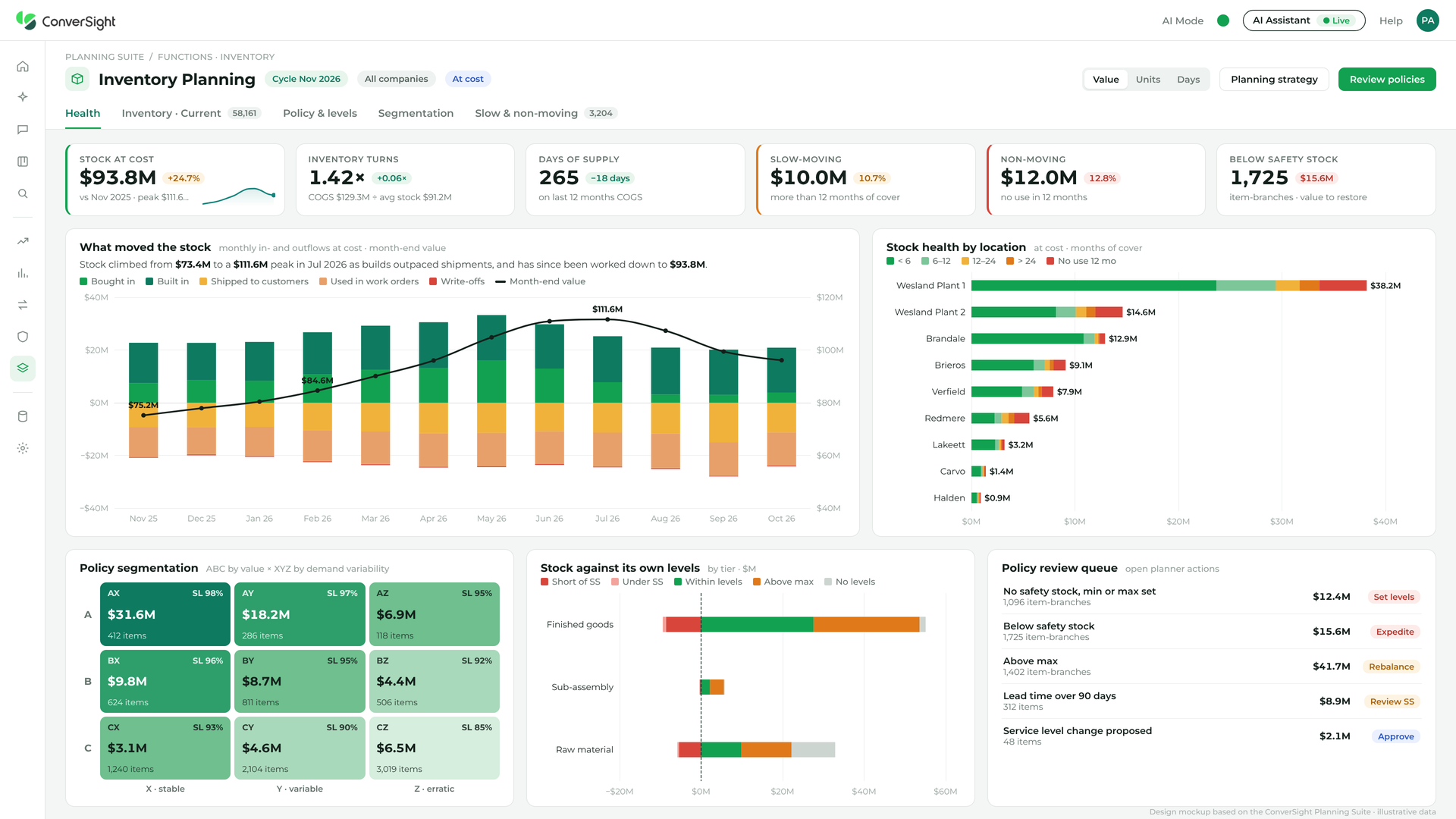
ConverSight inventory planning software showing safety stock and reorder points by item tier

Inventory planning tools for the three problems that cost you the most

Where inventory planning usually breaks, and how our inventory planning solutions fix it.
THE PROBLEM

Buffers set by hand, years ago

Safety stock was set once from a rule of thumb, and nobody can say what service level it buys today.
THE FIX

Safety stock from each item’s own data

Each buffer comes from that item’s demand variability and service level, and recalculates as demand moves.
THE PROBLEM

Items with no policy at all

Many make-to-stock items carry no safety stock, so they’re planned by default until they run out.
THE FIX

Every item gets a strategy

Make-to-stock or make-to-order, service level, and safety stock are set per item, so nothing is planned by default.
THE PROBLEM

Lead times moved, reorder points didn’t

Suppliers now take longer than the item master says, so reorders trigger too late.
THE FIX

Reorder points that follow reality

Purchase cycle, deliveries per year, and purchase units are observed from history, and you override only where they’re wrong.
Industrial equipment · Fishbowl

NOV automated manual inventory planning across Fishbowl

“ConverSight has helped us keep our inventory levels as clean as possible.”

DW
Dustin W.
Director of Technology and Operations
The result
28%
decrease in stockouts

How it works

The same four steps every planning cycle, on the data already in your ERP.
How It Works Strategy
Strategy
Make-to-stock or make-to-order, and service level, per item.
How It Works Calculate
Calculate
Safety stock, min, and reorder point from demand and lead time.
How It Works Compare
Compare
Current inventory against the optimum, by tier: finished goods, sub-assembly, raw material.
How It Works Approve
Approve
Policy changes go to review in Decision Hub before they drive the plan. Our inventory Planner agent flags items drifting below safety stock and propose updates.

Ask about your inventory plan in plain language

Use Athena IQ, our AI assistant, or Claude or ChatGPT over MCP. Each one answers from the same numbers.
“Supplier lead times increased. Which safety stock levels need changing?”
“Which make-to-stock items have no safety stock?”
“What does raising service level on A items to 98% cost in inventory?”

Legacy inventory planning software vs. ConverSight

Most inventory planning software sets buffers once and leaves them, so policies drift as demand and lead times move. 
Ours recalculates every buffer from each item’s own data and shows the reason behind it.
Included
Partly, or with extra work
Not included
Legacy inventory planning software
ConverSight inventory planning
Deployment
A separate system fed by exports
Sits on the ERP you already run.
Safety stock
Rules of thumb, or one percentage for every item
From each item’s demand variability, lead time, and service level
Coverage
Items left with no policy
A strategy for every item: make-to-stock or make-to-order, service level, and safety stock
Lead times
The contracted figure from the item master
Purchase cycles and lead times observed from history
Explaining the buffer
A number with no reason
Every buffer traceable to its demand, lead time, and service level
Service-level trade-off
What-ifs built in spreadsheets
See the inventory cost of a service level before you change it
Time to first value
Quarters of implementation and model tuning
Under 2 weeks

Inventory planning software questions, answered

What is inventory planning software?

Inventory planning software sets how much stock to hold for each item: its safety stock, reorder point, and stocking strategy, based on demand, lead time, and the service level you want. ConverSight sets these for every SKU from its own data and shows the reason behind each buffer.

How is inventory planning different from inventory optimization?

Inventory planning sets the policy for each item: safety stock, reorder points, and service levels. Inventory optimization looks across the network and the balance sheet, finding excess to transfer, hold, or liquidate.

How is safety stock calculated?

From each item’s demand variability, its lead time and lead-time variability, and the service level you set.

Can we override the numbers?

Yes. Any observed value, such as purchase cycle or purchase unit, can be overridden where you know better.

Which ERPs does it work with?

Acumatica, Fishbowl, Sage, SAP, NetSuite, Microsoft Dynamics, and Katana, among more than 150 connectors.

Where planning teams go next

Each one runs on the same copy of your ERP data, so adding it isn’t a new project.
Inventory Optimization
INVENTORY

Inventory Optimization

Balances service levels against cash tied up.
Inventory Forecasting
INVENTORY

Inventory Forecasting

Projects where each SKU’s stock will be, weeks ahead.
Replenishment Planning
INVENTORY

Replenishment Planning

Drafts the reorder when stock hits its reorder point.
Supply Planning
SUPPLY AND PRODUCTION

Supply Planning

Matches on-order supply to projected demand, by location.
25+ solutions on the same data.

See inventory planning in action